The service reminder on a Toyota Yaris is designed to alert the driver when an oil change or scheduled maintenance is due. After the required service has been completed, the reminder can be reset manually through the instrument cluster or vehicle menu.
This guide applies to Toyota Yaris models produced between 2011 and 2020 equipped with various dashboard display types.
Applicable Vehicle
- Make: Toyota
- Model: Yaris
- Generation: XP130
- Years: 2011–2020
- Engine example: 1.0 VVT-i (1KR-FE)
- Procedure type: Service indicator reset
What the Service Indicator Means
The service indicator on the Toyota Yaris primarily tracks oil change intervals. Once the required maintenance has been performed, the system must be reset to restart the service interval countdown.
Reset Procedure (Vehicles Without Keyless Start)
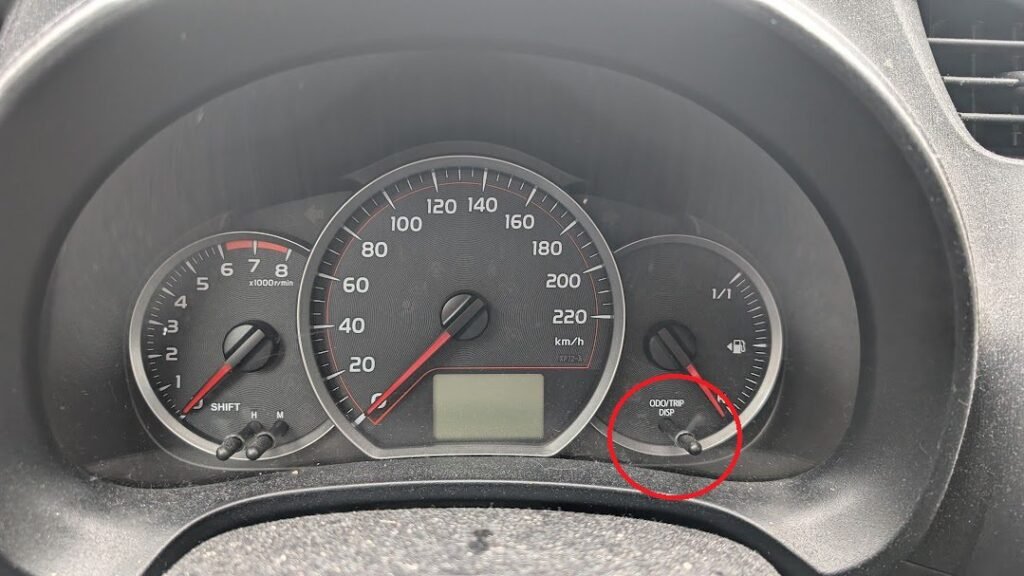
- Turn the ignition to the ON position.
- Press the trip/odometer button until the display shows TRIP A.
- Switch the ignition OFF.
- Press and hold the trip reset button.
- While holding the button, turn the ignition back to ON.
- Keep holding the button until a countdown appears on the display.
- Continue holding until the display resets to 000000.
- Release the button once the reset is complete.
Reset Procedure (Vehicles With Keyless Start)
For vehicles equipped with a start/stop button, the reset procedure is similar but the ignition is activated electronically.
- Do not press the clutch or brake pedal.
- Press the start/stop button twice to switch the ignition on.
- Press the trip button until TRIP A appears.
- Turn the ignition off.
- Press and hold the trip button.
- Press the start button twice again to switch the ignition on.
- Hold the button until the countdown finishes.
- Release the button when the display resets.
Reset Using Vehicles With Touchscreen Display
- Turn the ignition on.
- Open the Applications menu.
- Select Maintenance.
- Choose Scheduled Maintenance.
- Select Reset to clear the service reminder.
Important Notes
- The reset should only be performed after the required service has been completed.
- If the service light returns quickly, verify that the reset procedure was completed correctly.
- The indicator is designed primarily for oil change intervals.
More Maintenance Procedures for the Toyota Yaris
You can find additional maintenance procedures for this model on the Toyota Yaris maintenance hub.